Free SEO extension 🔥

Search intent cluster tool

Paste a list of keywords. Each gets classified by likely search intent (informational, commercial, transactional, navigational) using common signal words, then grouped into clusters by shared topic words.

Works with
  • Google
Intent breakdown
Topic clusters

What is search intent?

Search intent is the goal behind a search. People searching "what is a sitemap" want to learn (informational), "best sitemap plugin" want to compare options (commercial), "buy hiking boots size 10" want to purchase (transactional), and "seospidie login" want a specific site (navigational).

Matching intent is one of the most important ranking factors: Google shows the type of page that satisfies most searchers. A product page rarely ranks for an informational question, and a long guide rarely ranks for a ready-to-buy search.

Grouping keywords by intent and topic tells you which keywords belong on the same page and which need their own page — the foundation of a sensible content plan and site structure.

Why use the Search Intent Cluster Tool?

Keywords that look different often share the same intent — and should be targeted by the same page. Grouping a keyword list by intent (informational, commercial, transactional, navigational) turns a messy list into a clear content plan.
How to use it

  1. Paste your keyword list, one per line.
  2. Review how each keyword is classified by intent.
  3. Use the clusters to decide which keywords belong on the same page.

Tips for better results

  • Informational keywords suit guides; transactional ones suit product and category pages.
  • Check the live search results — the page types Google already ranks reveal the real intent.
  • One cluster, one page avoids cannibalization.

Step by step, with screenshots

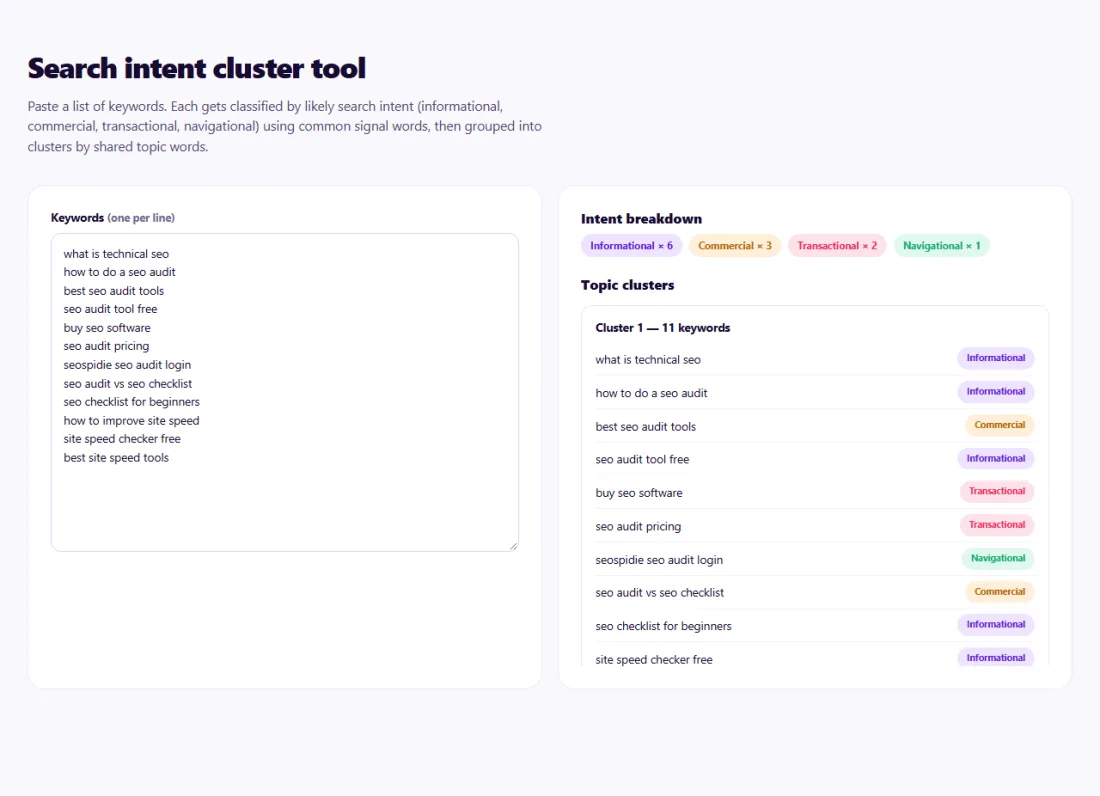
  1. 1Paste your keywords to classify their intent and group them into topic clusters.
    Step 1: Paste your keywords to classify their intent and group them into topic clusters.

Features of the Search Intent Cluster Tool

  • Intent classification. Each keyword is classified as informational, commercial, transactional or navigational using common signal words.
  • Topic clusters. Keywords are grouped by shared topic words.
  • Bulk input. Paste a long keyword list at once.
  • Private. Runs in your browser.

Who is it for?

  • Content planners: turn a keyword list into page ideas.
  • Online stores: separate buying keywords from research keywords.
  • SEO specialists: build keyword maps for a site.
  • Bloggers: avoid writing several posts for one search.

Understanding your results

Each cluster is a candidate page. Keywords in the same cluster with the same intent usually belong on one page; clusters with mixed intent may need a guide and a product or category page.

Because classification uses signal words, review the results — a keyword without a clear signal word may need your judgment. Searching the keyword and looking at the top results is the best final check.

Example: turning a keyword list into a content plan

A coffee equipment shop in Melbourne had a list of 80 keywords from its research and did not know which pages to create.

The Search Intent Clusters tool grouped them into clusters such as "espresso machine prices" (commercial), "how to descale an espresso machine" (informational) and "buy espresso machine" (transactional). The shop mapped transactional clusters to category pages, commercial clusters to comparison guides and informational clusters to blog posts — ending with 14 planned pages instead of 80 separate ones.

Common mistakes to avoid

  • Creating one page per keyword instead of per cluster.
  • Targeting transactional keywords with blog posts.
  • Ignoring mixed-intent keywords that need both page types.
  • Never checking what actually ranks.

Frequently asked questions

How is intent detected?

From modifier words in each keyword ("how", "best", "buy", brand names and more), in your browser.

Can one keyword have mixed intent?

Yes. When results show both guides and products, consider covering both on one strong page.

How many keywords can I paste?

Hundreds work comfortably; very large lists are best split by topic.

What are the four types of search intent?

Informational (learn), commercial (compare), transactional (buy or act) and navigational (find a specific site).

Why does intent matter for SEO?

Search engines show the type of page that satisfies most searchers, so a page must match the intent behind the keyword to rank.

How do I check intent for a keyword?

Search it and look at the top results: guides suggest informational intent, product pages transactional intent.

Is my data private?

Yes. Search Intent Cluster Tool runs entirely in your browser — nothing you type or paste is sent to or stored by SeoSpidie.

Is it free?

Yes. The Search Intent Cluster Tool is free to use with no sign-up. SeoSpidie is supported by advertising.

From the blog
How to Validate GTIN, EAN and UPC Barcodes in Bulk
Check every barcode in your catalogue at once, understand why numbers fail and fix them before your feed is rejected.
How to Write SEO-Friendly URL Slugs (With Examples)
Rules and examples for clean, readable URL slugs, and why changing existing URLs needs care.
What Is a GTIN and How to Check If a Barcode Is Valid
GTINs, EANs and UPCs explained, how the check digit catches errors, and when online sellers need a real barcode.
How to Compare Your Website SEO With a Competitor, Side by Side
Run a free side-by-side SEO comparison with up to three competitors and turn the gaps into clear tasks.
How to Find Google Product Category IDs for Your Feed
Search Google’s product taxonomy, choose the most specific match and add the ID to your feed in a few minutes.
How to Do a Competitor SEO Analysis for Free, Step by Step
Identify who you really compete with in search, compare the right things and turn what you learn into a plan.
How to Choose the Right Google Product Category for Your Products
How Google’s product taxonomy works, when to set the category yourself and how to pick the most accurate one.
How to Check If Image URLs Are Working in Bulk
Test a whole list of image URLs at once and find the broken ones before customers or Merchant Center do.
How to Validate a Product Feed Before Uploading to Merchant Center
Catch missing attributes and format errors in your product feed with a free validator before Google disapproves anything.
How to Fix Common Google Merchant Center Feed Errors
The Merchant Center errors that disapprove the most products, what causes each one and how to fix it for good.