Free SEO extension 🔥

Readability counter

Paste any text to check how easy it is to read. Works with any language — English uses the Flesch reading-ease formula; other scripts (Tamil, Hindi, Arabic, CJK, etc.) get a script-neutral difficulty estimate, since Flesch's syllable math is English-specific.

-
Flesch score
Paste text to begin

What is readability?

Readability describes how easy a text is to read and understand. Short sentences, familiar words and clear structure make content easier; long sentences, jargon and dense paragraphs make it harder. Readability formulas estimate this from measurable features such as sentence length and word length.

The best known is the Flesch reading-ease score for English, which runs from 0 to 100 — higher means easier. A related grade level estimates the school level needed to follow the text. These formulas rely on English syllable patterns, so other languages need a more neutral estimate based on sentence and word length.

Readable content keeps visitors on the page, helps people on phones and those reading in a second language, and makes answers easier for search engines and AI tools to quote. Readability is not about simplifying ideas — it is about expressing them clearly.

Why use the Readability Checker?

Most people skim online. Text written at an accessible reading level keeps visitors on the page longer and makes your content easier for search engines and AI systems to summarise.
How to use it

  1. Paste your text.
  2. Read the Flesch reading-ease score, grade level, word and sentence counts and reading time.
  3. Shorten long sentences and replace jargon, then check again.

Tips for better results

  • For general audiences, aim for a reading ease of 60 or higher.
  • Keep most sentences under about 20 words.
  • Use subheadings and lists to break up long passages.

Step by step, with screenshots

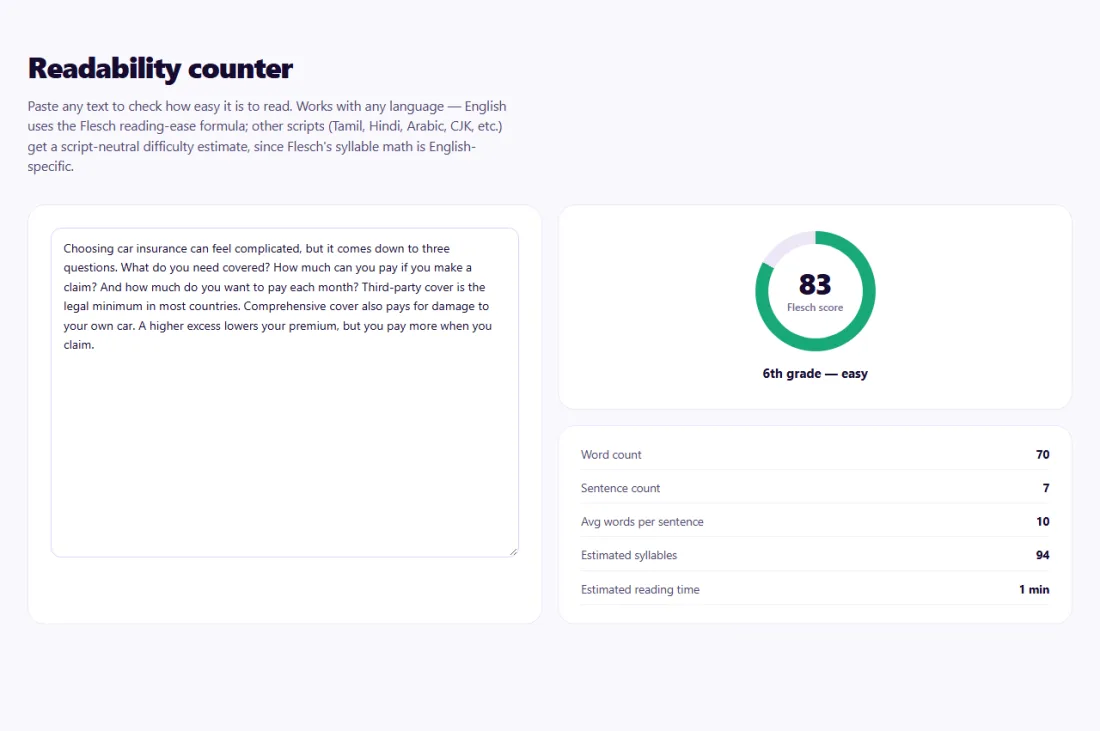
  1. 1Paste your text to get the reading-ease score, grade level, counts and reading time.
    Step 1: Paste your text to get the reading-ease score, grade level, counts and reading time.

Features of the Readability Checker

  • Flesch reading-ease score. For English text, with an approximate grade level.
  • Script-neutral estimate. A difficulty estimate for other languages and scripts.
  • Word and sentence counts. Plus average sentence length and reading time.
  • Private. Your text stays in your browser.

Who is it for?

  • Bloggers: make long guides easier to follow.
  • Businesses: check that service pages are clear to customers.
  • Students and teachers: measure the difficulty of a text.
  • Editors: compare drafts before publishing.

Understanding your results

For most websites, a Flesch score of about 60 or higher suits a general audience. Technical audiences can handle lower scores, but shorter sentences still help.

To improve the score, split sentences longer than about 20–25 words, replace jargon with everyday words or explain it, use lists for steps, and break long paragraphs. Then check again.

Example: simplifying an insurance guide

An insurance broker in Johannesburg published a guide to choosing car insurance, but analytics showed most visitors left within 30 seconds.

The Readability Checker gave the guide a Flesch score of 32 with an average sentence length of 31 words. The broker split long sentences, replaced terms such as "indemnification" with plain explanations, and turned the comparison of policy types into a short list. The rewritten guide scored 62, visitors spent more than twice as long on the page, and more of them requested quotes.

Common mistakes to avoid

  • Treating the score as a ranking factor rather than a writing aid.
  • Over-simplifying expert content until it loses accuracy.
  • Ignoring paragraph length and headings, which formulas do not measure.
  • Applying English formulas to other languages.

Frequently asked questions

What is the Flesch reading-ease score?

A 0–100 score based on sentence length and syllables per word; higher means easier to read.

Does it work for languages other than English?

Word, sentence and reading-time counts work for any language; the Flesch score is designed for English.

Is my text stored?

No. Everything is calculated in your browser.

What is a good readability score?

For general audiences, a Flesch score of about 60 or higher. Technical audiences can handle lower scores, but shorter sentences still help.

Does readability affect SEO?

Not as a direct ranking factor, but clear writing keeps readers on the page and makes answers easier to quote.

How is reading time calculated?

From the word count and an average reading speed, so treat it as an estimate.

Is my data private?

Yes. Readability Checker runs entirely in your browser — nothing you type or paste is sent to or stored by SeoSpidie.

Is it free?

Yes. The Readability Checker is free to use with no sign-up. SeoSpidie is supported by advertising.
From the blog
How to Validate GTIN, EAN and UPC Barcodes in Bulk
Check every barcode in your catalogue at once, understand why numbers fail and fix them before your feed is rejected.
How to Write SEO-Friendly URL Slugs (With Examples)
Rules and examples for clean, readable URL slugs, and why changing existing URLs needs care.
What Is a GTIN and How to Check If a Barcode Is Valid
GTINs, EANs and UPCs explained, how the check digit catches errors, and when online sellers need a real barcode.
How to Compare Your Website SEO With a Competitor, Side by Side
Run a free side-by-side SEO comparison with up to three competitors and turn the gaps into clear tasks.
How to Find Google Product Category IDs for Your Feed
Search Google’s product taxonomy, choose the most specific match and add the ID to your feed in a few minutes.
How to Do a Competitor SEO Analysis for Free, Step by Step
Identify who you really compete with in search, compare the right things and turn what you learn into a plan.
How to Choose the Right Google Product Category for Your Products
How Google’s product taxonomy works, when to set the category yourself and how to pick the most accurate one.
How to Check If Image URLs Are Working in Bulk
Test a whole list of image URLs at once and find the broken ones before customers or Merchant Center do.
How to Validate a Product Feed Before Uploading to Merchant Center
Catch missing attributes and format errors in your product feed with a free validator before Google disapproves anything.
How to Fix Common Google Merchant Center Feed Errors
The Merchant Center errors that disapprove the most products, what causes each one and how to fix it for good.