Free SEO extension 🔥

Bulk SEO audit Beta

Paste up to 100 URLs — or load them from your sitemap — and audit every page at once: status codes, redirects, titles, meta descriptions, headings, canonicals, indexability, speed, images, links and structured data. Download the full report as an Excel workbook or CSV.

Works with
  • Google
  • Bing
  • Google Search Console

Free, no sign-up. Up to 100 URLs per audit. We respect each site's robots.txt and don't store your URLs or reports.

Beta: this tool is new and we are improving it every week. Spotted something wrong or missing? Send us feedback.

0 URLs
What each URL is checked for
  • Status code, redirects and redirect chains
  • Indexability: noindex, X-Robots-Tag, canonical, robots.txt
  • Title and meta description — missing, too long, duplicates
  • H1 and H2 headings, word count, thin content
  • Response time and page size
  • Images without alt text, internal and external links
  • Mobile viewport, HTTPS, language, Open Graph, schema, hreflang
  • A 0–100 score and a fix for every issue
Need more than 100 URLs, scheduled re-audits or white-label reports?

We're building bigger audits for agencies and growing sites. Tell us what you need and we'll let you know when it's ready.

Tell us what you need
SeoSpidie
SeoSpidie SEO Site Audit for Chrome

Check the title, meta description, headings, links and images of any page you visit, in one click. Free, no sign-up.

Add to Chrome, free

Coming soon to SeoSpidie

Free · no sign-up, like every SeoSpidie tool

New tools we’re building next. Want one sooner, or have an idea? Tell us.

  • Robots.txt Tester SoonTest any URL against a site’s robots.txt rules for Googlebot, Bingbot and AI bots.
  • Sitemap Validator SoonFind redirects, 404s, noindexed pages and wrong-host URLs inside your XML sitemap.
  • Schema Validator SoonCheck structured data against Google’s required and recommended properties.
  • Hreflang Checker SoonValidate language codes, return links and x-default across your international pages.
  • Image Compressor & WebP Converter SoonShrink images and convert them to WebP right in your browser.
  • QR Code Generator SoonQR codes for links, WhatsApp chats, reviews and UTM-tagged campaigns.

What is a bulk SEO audit?

An SEO audit checks a web page for the technical and on-page issues that stop it from ranking or getting clicks: errors, redirects, missing titles and descriptions, weak headings, indexing blocks, slow responses and missing structured data. A bulk audit runs the same checks on many pages at once and puts the results side by side.

Looking at pages together reveals problems you never see one page at a time. Duplicate titles and meta descriptions only appear when several pages are compared. A noindex tag left on one product among a hundred is easy to miss when checking manually, but obvious in a filtered list. Patterns — every blog post missing an Open Graph image, every category page with two H1 headings — point to template problems you can fix once for the whole site.

A bulk audit is also the easiest way to report on a site. A spreadsheet with one row per page and one column per check can be filtered, sorted and shared with a developer, a client or a team.

Why use the Bulk SEO Audit?

Checking pages one at a time is slow, and problems hide in the pages nobody looks at: an old post that now returns 404, a product with a noindex tag, fifty pages sharing one title. Auditing a whole list at once shows every problem side by side, sorted by how much it matters, in a report you can share with your team or client.
How to use it

  1. Paste up to 100 URLs, or enter your website to load them from its sitemap.
  2. Start the audit — results appear live as each page is checked.
  3. Filter by problem, open any page for its full issue list, then download the report as Excel or CSV.

Tips for better results

  • Fix critical issues first: broken pages, noindex tags and robots.txt blocks stop pages from ranking at all.
  • Duplicate titles and descriptions only show up when you audit many pages together — check the Summary sheet.
  • Re-run the audit after fixing things and compare the average score.

Step by step, with screenshots

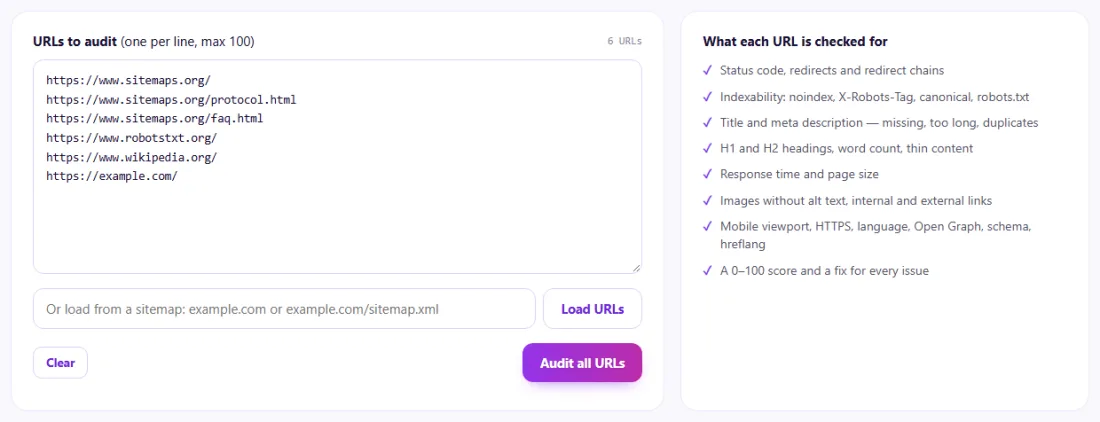
  1. 1Paste up to 100 URLs, or load them from your sitemap.
    Step 1: Paste up to 100 URLs, or load them from your sitemap.
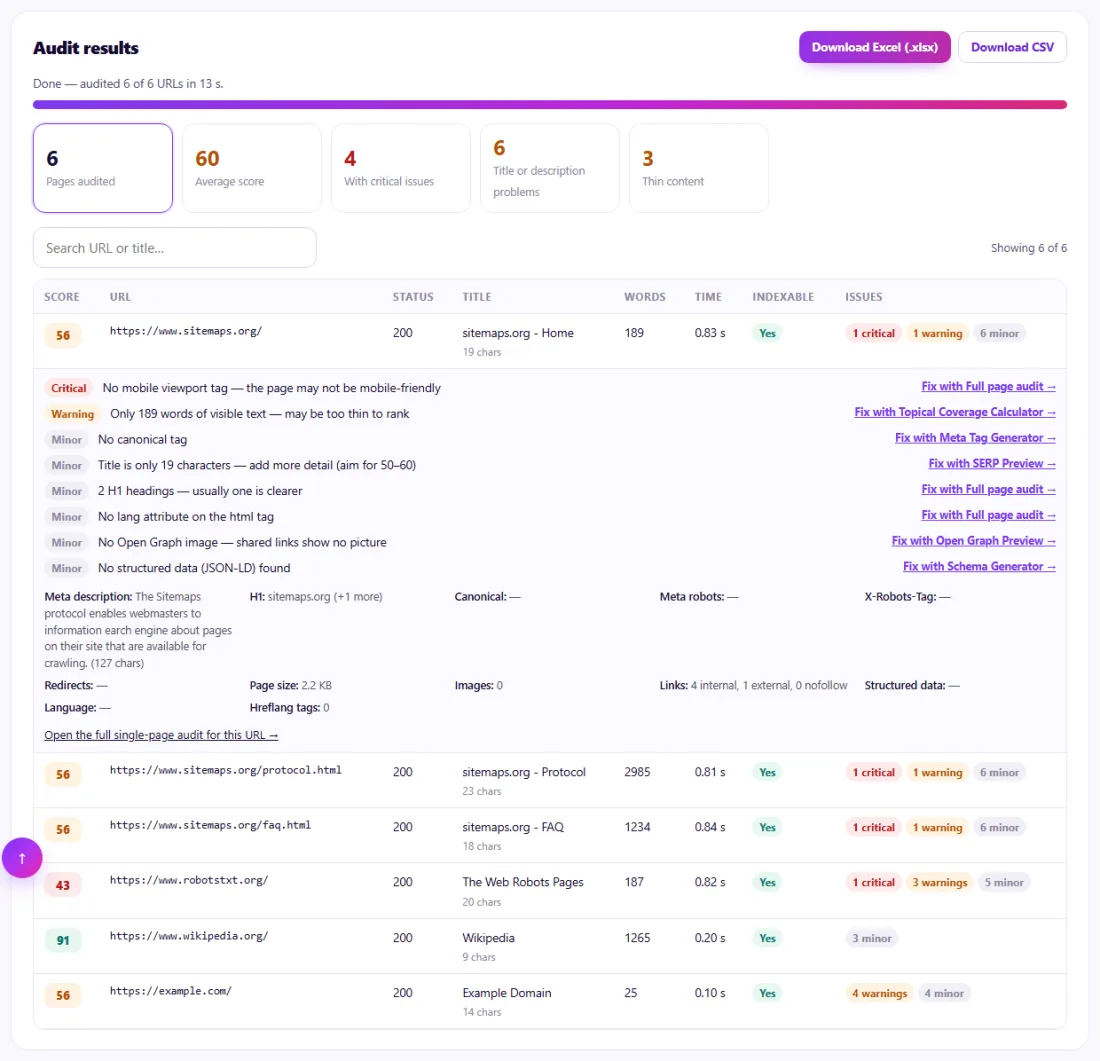
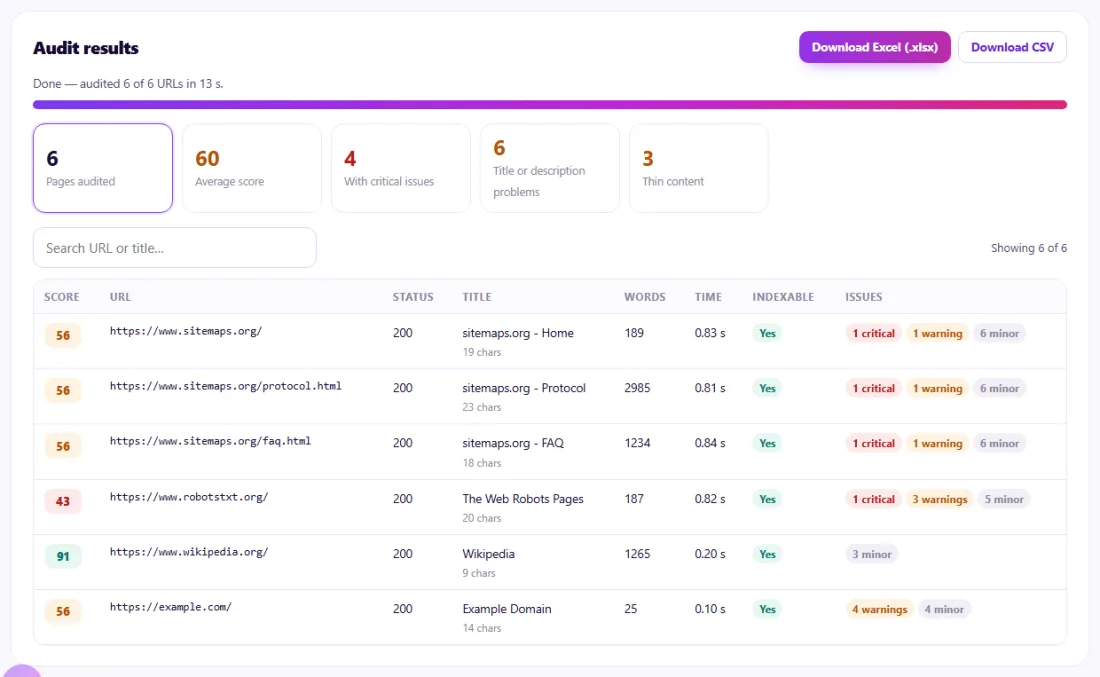
  2. 2Results arrive live with a score, status, title, indexability and issues for every page.
    Step 2: Results arrive live with a score, status, title, indexability and issues for every page.
  3. 3Open any page to see each issue with a link to the tool that fixes it — then download Excel or CSV.
    Step 3: Open any page to see each issue with a link to the tool that fixes it — then download Excel or CSV.

Features of the Bulk SEO Audit

  • Up to 100 URLs per audit. Paste a list or load the URLs from your sitemap.
  • Live results. Pages are checked a few at a time and appear as soon as each one finishes.
  • About 40 checks per page. Status, redirects, indexability, titles, descriptions, headings, word count, speed, images, links, schema, hreflang and more.
  • Duplicate detection. Titles and descriptions repeated across the audited pages are flagged.
  • Score and fixes. Each page gets a score from 0 to 100, and each issue links to the SeoSpidie tool that helps fix it.
  • Excel and CSV export. Download a three-sheet Excel report or a CSV file.

Who is it for?

  • Site owners: find the pages that need attention first.
  • Agencies and freelancers: produce a client-ready audit spreadsheet in minutes.
  • Online stores: check batches of product and category pages after updates.
  • Content teams: audit every post in a section before a content refresh.

Understanding your results

Start with pages scoring below 50 and with critical issues: errors, noindex tags, robots.txt blocks and missing titles stop pages from ranking at all. Then work through warnings such as missing descriptions, thin content and slow responses, and finally the minor issues.

In the Excel report, the Summary sheet lists the most common issues across all pages — usually the best place to find a template fix that solves many rows at once. Re-run the audit after fixing things and compare the average score.

Example: auditing a blog before a content refresh

A personal finance blog in Singapore had 90 posts written over five years and wanted to know where to start improving them.

The owner loaded the URLs from the sitemap and ran the Bulk SEO Audit. The Summary sheet showed the biggest patterns: 31 posts shared a generic meta description from the theme, 12 posts had two H1 headings, and seven older posts returned 404 because they had been deleted without redirects. The owner fixed the theme so each post used its own excerpt as the description, corrected the heading template, and redirected the deleted posts to the closest current guides. A second audit two weeks later raised the average score from 61 to 84.

Common mistakes to avoid

  • Fixing minor issues first while critical ones remain.
  • Treating the score as a ranking prediction; it measures fixable issues, not competition.
  • Auditing only the homepage and assuming the rest of the site is the same.
  • Ignoring duplicate titles because each page looks fine on its own.

Frequently asked questions

How many URLs can I audit?

Up to 100 URLs per audit, free and without sign-up. You can run another audit for the next 100 after a few minutes.

What does the Excel report contain?

Three sheets: a Summary with the overall score and the most common issues, a Pages sheet with about 40 columns per URL (status, redirects, title, description, headings, canonical, indexability, speed, links, images, schema and more), and an Issues sheet listing every issue with a link to the SeoSpidie tool that fixes it.

Why could some pages not be audited?

Some sites block automated tools with bot protection, and some URLs are blocked by the site's own robots.txt, which we respect. For pages behind bot protection, use the free SeoSpidie Chrome extension, which audits the page inside your own browser.

How is the score calculated?

Each page starts at 100. Critical issues (such as a 404 error or noindex tag) cost the most, warnings (such as a missing meta description) less, and minor issues (such as a long title) the least. Broken pages score 0.

Does it check Core Web Vitals?

It measures server response time and page size, which affect loading speed. Core Web Vitals need a real browser and real-user data — use PageSpeed Insights for those.

Does the audit follow robots.txt?

Yes. URLs that a site's robots.txt asks bots not to visit are reported as blocked and are not fetched, and crawl-delay rules are respected.

Can I audit pages from different websites in one run?

Yes. You can mix URLs from several sites, although duplicate title checks are most useful within one site.

Is my data private?

To read other websites, SeoSpidie's server fetches the public URLs you enter and sends the result back to your browser. We don't keep your reports or require an account. Text you paste stays in your browser. Fair-use limits apply to protect the service.

Is it free?

Yes. The Bulk SEO Audit is free to use with no sign-up. SeoSpidie is supported by advertising.

From the blog
Duplicate Without User-Selected Canonical: What It Means and How to Fix It
Why Search Console reports duplicates with no chosen canonical, when it matters, and the fixes that settle it.
AI Crawler Checker: See Which AI Bots Can Crawl Your Website
Check, bot by bot, which AI crawlers your robots.txt allows or blocks, and create a starter llms.txt in the same place.
How to Find Low Competition Keywords for a New Website
A free, practical method to spot keywords where the current results are weak, so a new site can rank sooner.
Core Web Vitals Explained for Beginners: LCP, INP and CLS
What LCP, INP and CLS measure, the scores to aim for, and the simple fixes that make the biggest difference.
How to Update Old Blog Posts to Improve Rankings
A repeatable process for choosing which old posts to refresh and what to change so they climb back up.
Local Business Schema Markup: Example and Step-by-Step Setup
What LocalBusiness schema includes, a field-by-field example, choosing the right subtype and testing it properly.
How to Check If a Page Is Indexed by Google (4 Free Ways)
Four free ways to see whether Google has indexed a page, and what to do when it has not.
One Product Feed for Multiple Channels: Google, Facebook, Pinterest and More
How to manage one source of product data and export consistent feeds to every sales channel, without errors.
How Long Should a Blog Post Be for SEO? An Honest Answer
Why there is no magic word count, and how to decide the right length for each post from what searchers actually need.
How to Get Backlinks for a New Website (Free, Safe Methods)
Practical, free and policy-safe ways to earn your first backlinks, and the shortcuts that can get a new site penalised.